› Create a property listings app for Kite Property, a design-led estate agency in Copenhagen. Each property has a large photograph, a headline, a short description, the neighbourhood, the price in Danish kroner, the number of bedrooms, the number of bathrooms, the floor area in square metres and a property type. Include a home page of featured homes, a browse page with filters, a property page with the full description and an enquiry form, and an about page
Follow these steps in the Beetler builder to reproduce this exact app. Button and chip names are written the way they appear on screen.
- Pick the build type.On the home screen, under “What are you building?”, click the Web app chip.

- Describe the app and its fields.Name every field you want on a record — a large photograph, a headline, a short description, the neighbourhood, the price in Danish kroner, bedrooms, bathrooms, the floor area in square metres and a property type. Those words become the data model, and “price in Danish kroner” and “square metres” are what stop you getting a US listings app.
- Choose a tone.Under “App personality”, click Creative. Tone and domain each hold an opinion and they combine: Creative supplies the saturated spruce-and-aqua palette and the humanist sans, while the domain supplies the card grid and where the filters sit. Neither is anything you pick by hand.

- Click Build It — then take the AI path.This is the step that caught us out. Beetler recognised the prompt as its stock Real Estate Listings template and built that instantly, for free — a Manchester agency with pounds and an “About GreenLeaf” page, nothing like the paragraph we typed. The banner above it offers Use AI instead; click it and the six-stage pipeline runs on your actual words. Thirty seconds and 15 credits, and you get your schema instead of the template’s.

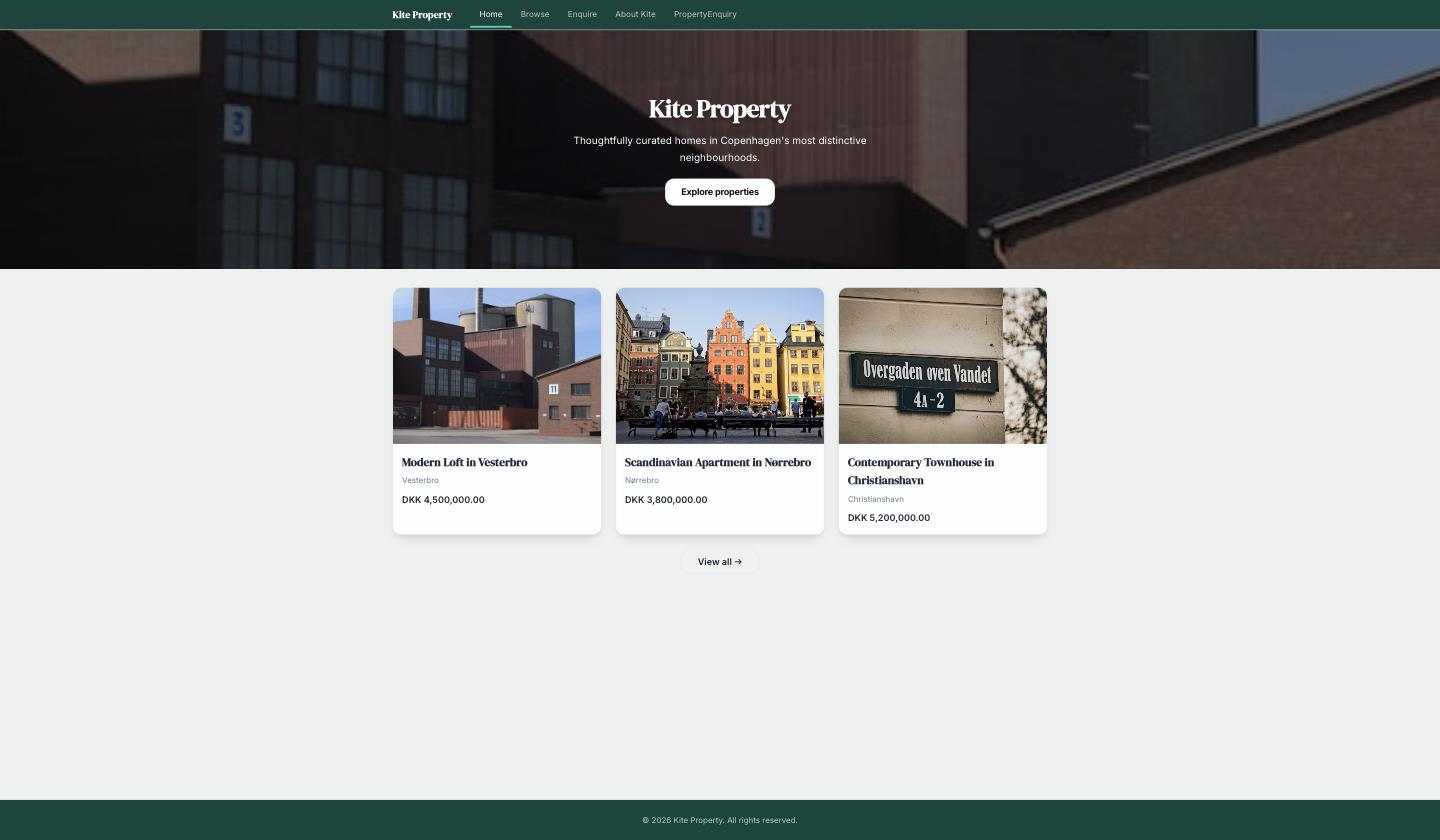
- Watch it lay out the agency.Four pages — Home (a hero and three featured homes), Browse (search, a property-type filter and the full grid), Property Detail, and About, which carries the enquiry form.
- Set currency & region.Click Locale, set Currency to DKK and Date format to UK / Europe, then Apply Locale Settings. Every price on every page reformats — you never touch a number.
- Fill it with homes.Click Data then Generate Data. Set Property to 12 and AgencyInfo to 1, leave Image source on Auto (stock photos), and add two assertions:That second assertion is doing the photography: Beetler builds each image search out of the opening words of the description, so “Converted warehouse natural light…” finds a warehouse conversion. Nine of the twelve landed on Copenhagen-looking frames; the other three are plausible Nordic buildings in the wrong city — worth knowing before you promise a client exact addresses. Click Generate, then Accept & Save.Twelve Copenhagen homes across Vesterbro, Nørrebro, Christianshavn, Frederiksberg, Islands Brygge and Østerbro, priced in Danish kroner between 2,500,000 and 14,000,000
Each description opens with the building and its interior in English, for example: Nordic apartment white walls oak floors tall windows courtyard - Rebuild so the pages pick up the photos.Open My Apps, click Rebuild on Kite Property and choose Just Rebuild. All thirty-six photographs are real Unsplash frames; the hero takes one of them instead of a stand-in.
- Check the palette and type — you do not pick them.Creative resolves to a design spec the compiler reads: a deep spruce header, an aqua primary, an indigo accent that is nowhere near either, and Work Sans throughout. Set the same prompt to Luxury and you would get a full-bleed hero in warm neutrals instead — same data, different building.
- Publish or export.Open My Apps and click Publish for a shareable link with a QR code, or Source to take the standalone React project away as a zip.
Type pairing
HeadingWork Sans
BodyWork Sans
What Beetler filled in
PagesHome, Browse, Property Detail, About
Homes12 across six neighbourhoods, each photographed
Per homephoto · headline · description · neighbourhood · kr · beds · baths · m² · type
Filterproperty type, from the enum Beetler inferred
The finished app
More recipes
Recipe A · Web app
TasteBud — a restaurant that takes bookings
A menu with real food photography and a working reservations flow.
See how it was built ↗
Recipe B · Slide deck
TasteBud — the pitch deck
One outline becomes eight designed slides in the Luxe style.
See how it was built ↗
Recipe C · Infographic
Beetler by the Numbers
Prose figures become stat tiles and an animated bar chart.
See how it was built ↗
Recipe D · Web app
Maison Aurele — a Paris atelier online
Sixteen photographed pieces in ink and champagne, priced in euros.
See how it was built ↗
Recipe E · Web app
Vela Studio — a studio that takes bookings
Twelve classes, five instructors and a booking flow in eucalyptus and coral.
See how it was built ↗
Recipe F · Web app
Meridian Journal — a magazine that reads
Twelve photographed essays from twelve countries, ink on paper.
See how it was built ↗