› Create a travel journal called Meridian Journal. Each essay has a large cover photograph, a headline, a standfirst, the writer, the place and the date. Include a home page of featured essays, an essays index, an essay page with the full text beside its cover photo and author, and an about page
Follow these steps in the Beetler builder to reproduce this exact app. Button and chip names are written the way they appear on screen.
- Pick the build type.On the home screen, under “What are you building?”, click the Web app chip.

- Describe the app and its fields.This one is a paragraph, not a line, and deliberately so. Name the fields you want on each record — a large cover photograph, a headline, a standfirst, the writer, the place and the date. Those words become the data model. We first built this app without mentioning photography and got a schema with no image field at all, which rendered as a column of bare title bars. The prompt decides whether your app has pictures.
- Choose a tone.Under “App personality”, click Minimal. It resolves to a centered shell — a single quiet column rather than a filter rail or a full-bleed gallery — with low-saturation colour and generous spacing. For long-form reading that is the whole design.

- Click Build It — then ask for the custom build.Beetler matches its stock Travel Blog template and offers it free. Click Generate custom (15 credits) to have the pipeline read your actual paragraph instead — that is what produces the coverPhoto / headline / standfirst / writer / place / date schema rather than the template’s generic one.

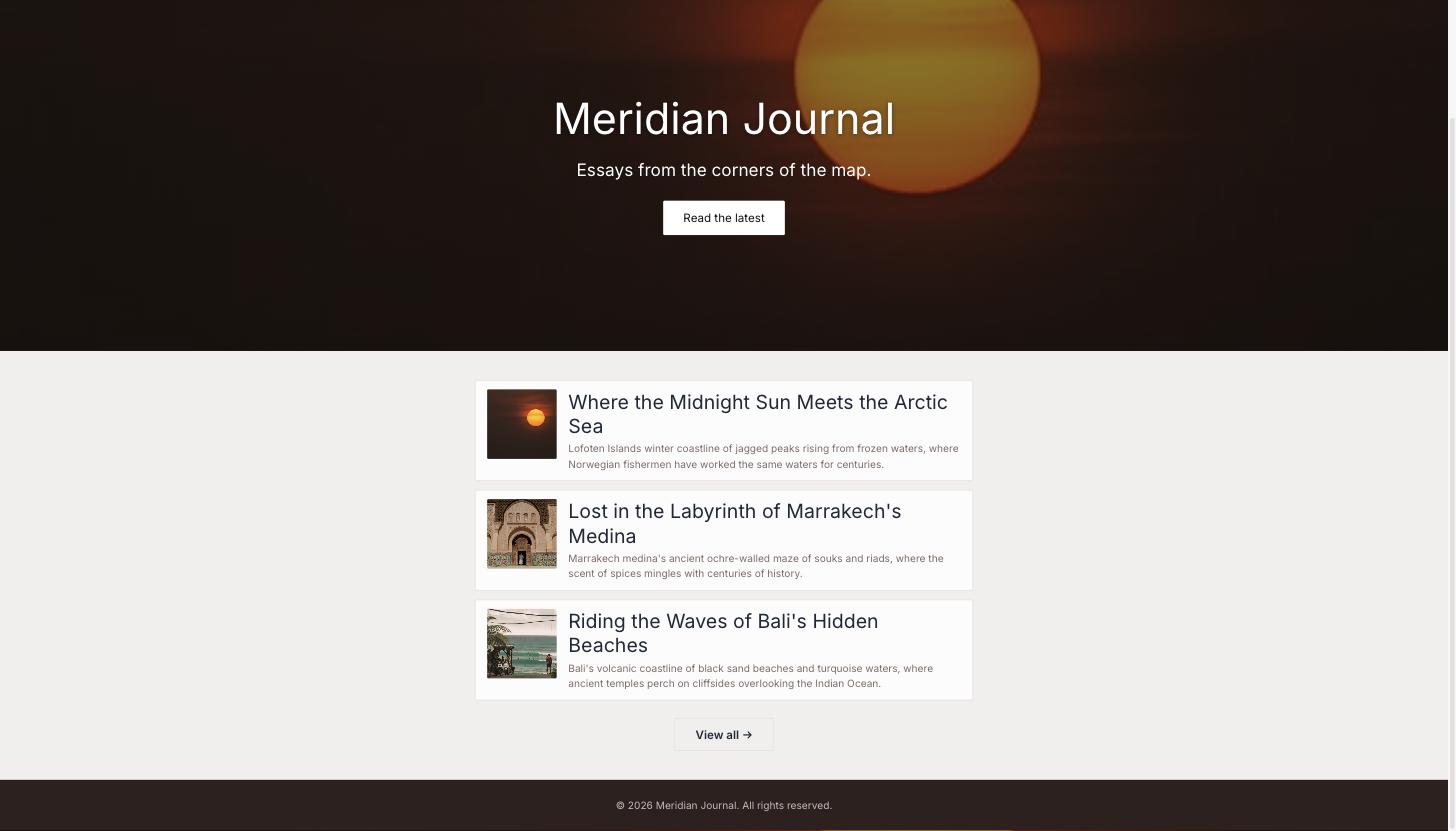
- Watch it lay out the journal.Four pages — Meridian Journal (the landing), Essays, Essay and About — with the landing page showing three featured essays and a View all → through to the index.
- Fill the journal with essays.Click Data then Generate Data. Set Essay to 12, leave Image source on Auto (stock photos), and add two assertions:That second assertion is doing real work: Beetler builds each photo search out of the opening words of the standfirst, so “Lofoten Islands winter coastline…” finds an Arctic shoreline, while “A journey that changed how I see…” finds nothing usable at all. All twelve essays came back with a real photograph. Click Generate, then Accept & Save.Twelve essays from twelve different countries, each with a place, a 2024 date and a named writer
Each standfirst is written in English and starts with the place and its landscape, for example: Lofoten Islands winter coastline - Rebuild so the pages pick up the photos.Open My Apps, click Rebuild on Meridian Journal and choose Just Rebuild. Now that every essay has a cover photo, the cards gain thumbnails and the hero takes a real photograph instead of a stock stand-in.
- Check the palette and type — you do not pick them.The Minimal tone plus the blog domain resolve to a design spec the compiler reads: a near-neutral ink header, a taupe accent held close to the primary, and Inter throughout. Minimal deliberately desaturates — restraint is the point — so this is the quietest of the three web-app recipes by design, not by accident.
- Publish or export.Open My Apps and click Publish for a shareable link with a QR code, or Source to take the standalone React project away as a zip.
The finished app
More recipes
Recipe A · Web app
TasteBud — a restaurant that takes bookings
A menu with real food photography and a working reservations flow.
See how it was built ↗
Recipe B · Slide deck
TasteBud — the pitch deck
One outline becomes eight designed slides in the Luxe style.
See how it was built ↗
Recipe C · Infographic
Beetler by the Numbers
Prose figures become stat tiles and an animated bar chart.
See how it was built ↗
Recipe D · Web app
Maison Aurele — a Paris atelier online
Sixteen photographed pieces in ink and champagne, priced in euros.
See how it was built ↗
Recipe E · Web app
Vela Studio — a studio that takes bookings
Twelve classes, five instructors and a booking flow in eucalyptus and coral.
See how it was built ↗
Recipe G · Web app
Kite Property — a Copenhagen estate agency
Twelve photographed homes priced in kroner, with a type filter.
See how it was built ↗