› Create an online jewellery boutique for Maison Aurele, a Paris atelier, with a collection of rings, necklaces, earrings and bracelets showing materials and prices, a piece detail page, a basket and a checkout
Follow these steps in the Beetler builder to reproduce this exact app. Button and chip names are written the way they appear on screen.
- Pick the build type.On the home screen, under “What are you building?”, click the Web app chip.

- Paste the one-line prompt.Type the prompt above into the box. Beetler reads the brand out of it and answers “Calling it Maison Aurele” — that name becomes the app’s title, header and footer, and it also seeds the palette, so the business name genuinely matters.
- Choose a tone.Under “App personality”, click Luxury. That one chip decides a great deal: sharp radii, hairline borders, airy density, a display serif, and a full-bleed-hero collection page rather than the sidebar-and-grid a shop would get.

- Click Build It.Beetler asks whether you have data to include — click No, generate it for me. It then spots that your prompt fits its stock Jewelry E-commerce Store template and offers you a choice: Use template (free) gives you the pre-built version instantly, Generate custom (15 credits) designs one from scratch for your brief. We took the custom build — that is what makes this app yours rather than the template everyone else gets.

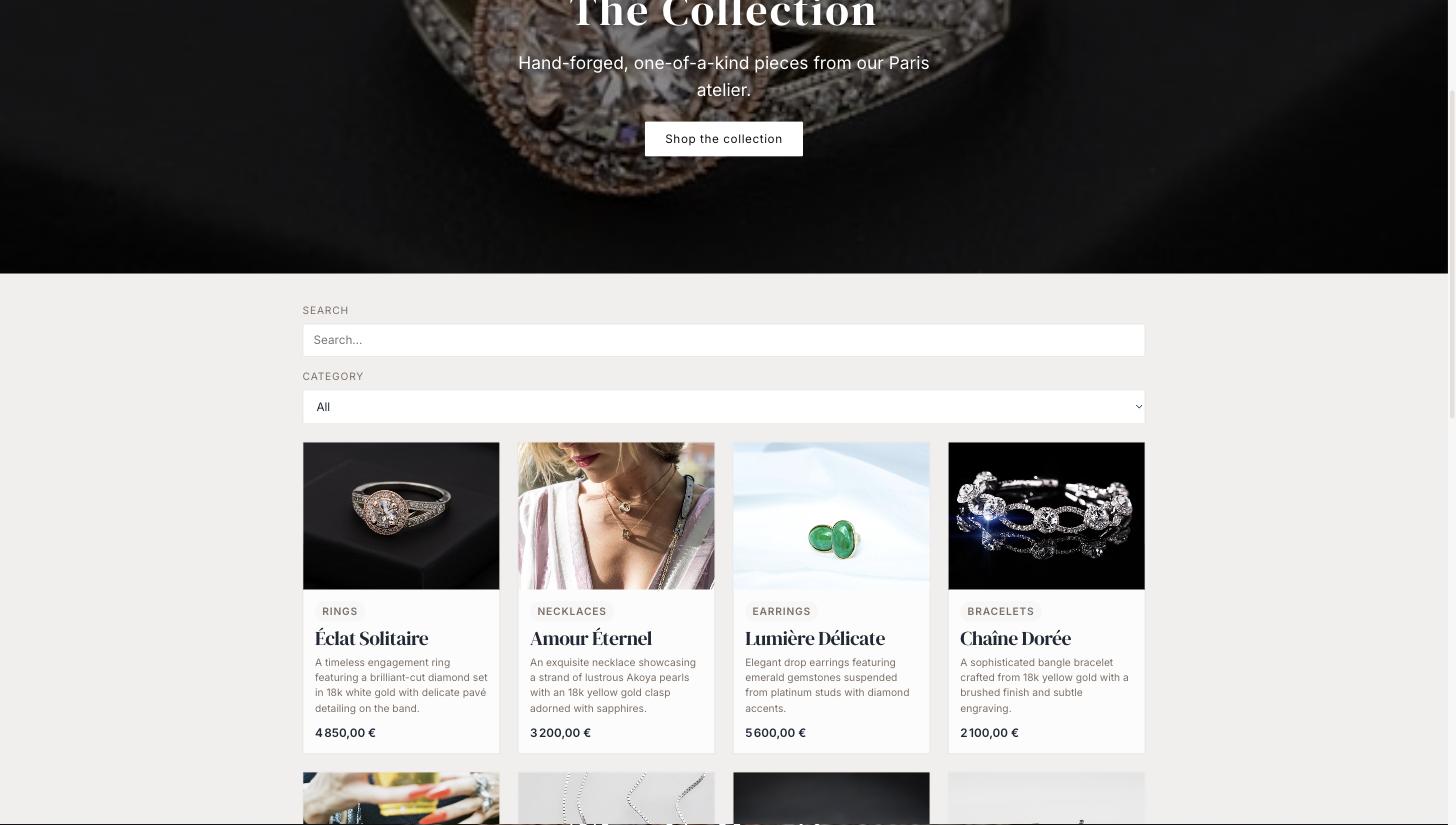
- Watch it lay out the shop.The pipeline runs in about 50 seconds and produces four pages — The Collection, Piece Detail, Your Basket and Checkout — wired together, with a working basket and a category filter.
- Fill the cabinet.A new app has a schema but no stock. Click Data then Generate Data. Set Category to 4, Piece to 16 and Order to 5, leave Image source on Auto (stock photos), and add three assertions so the catalogue reads like a real atelier’s:
Rebuild so the pages pick up the photos.
The pages were laid out before the stock existed, so the hero is still a placeholder. Open My Apps, click Rebuild on Maison Aurele and choose Just Rebuild — it regenerates the UI against the data you just saved.
Check the palette and type — you do not pick them.
The Luxury tone plus the shop domain resolve to a design spec, and the compiler reads it: an aubergine ink header, a mauve accent held close to the primary rather than fighting it, and DM Serif Display over Inter. Nothing here was hand-chosen — the palette is a function of domain, tone and the words in your prompt, so a different brand name genuinely lands on a different colour. If you do want to override, the chat box takes /style … and Typography pins specific fonts, but you are then off the spec.
Set currency & region.
Click Locale and set currency to EUR (€), date format to French (DD/MM/YYYY) and timezone to Paris (CET). Every price reformats instantly — 4 200,00 €, thin space and trailing symbol, the way a French shop writes it.
Publish or export.
Open My Apps and click Publish for a shareable link with a QR code, or Source to take the standalone React project away as a zip.
The finished app
More recipes
Recipe A · Web app
TasteBud — a restaurant that takes bookings
A menu with real food photography and a working reservations flow.
See how it was built ↗
Recipe B · Slide deck
TasteBud — the pitch deck
One outline becomes eight designed slides in the Luxe style.
See how it was built ↗
Recipe C · Infographic
Beetler by the Numbers
Prose figures become stat tiles and an animated bar chart.
See how it was built ↗
Recipe E · Web app
Vela Studio — a studio that takes bookings
Twelve classes, five instructors and a booking flow in eucalyptus and coral.
See how it was built ↗
Recipe F · Web app
Meridian Journal — a magazine that reads
Twelve photographed essays from twelve countries, ink on paper.
See how it was built ↗
Recipe G · Web app
Kite Property — a Copenhagen estate agency
Twelve photographed homes priced in kroner, with a type filter.
See how it was built ↗